Google Drive VS SkyDrive VS
iCloud VS Dropbox VS SugarSync

Google Driveis a file storage and sync service by Google that was released on April 24, 2012. Rumors about Google Drive began circulating as early as March 2006. Google Drive is an extension of Google Docs. Google Docs is a free, Web-based office suite and data storage service offered by Google. It allows users to create and edit documents online while collaborating in real-time with other users. Google Docs combines the features of Word and Spreadsheets with a presentation program incorporating technology designed by Tonic Systems. Data storage of files up to 1 GB total in size was introduced on January 13, 2010, but has since been increased to 10 GB, documents using Google Docs native formats do not count towards this quota.The largely anticipated cloud storage feature by Google is said to be replacing most of Docs' features in 2012. This extension or replacement of Google Docs called Google Drive was opened to the public on April 24, 2012.

SkyDrive(officially Microsoft SkyDrive, formerly Windows Live SkyDrive) is a file hosting service that allows users to upload and sync files to a cloud storage and then access them from a Web browser or their local device. It is part of the Windows Live range of online services and allows users to keep the files private, share them with contacts, or make the files public. Publicly shared files do not require a Windows Live ID to access. The service offers 7 GB of free storage for new users. Additional storage is available for purchase. Users who signed up to SkyDrive prior to April 22, 2012 could opt-in for a limited time offer of 25 GB of free storage upgrade. The service is built using HTML5 technologies, and files up to 300MB can be uploaded via drag and drop into the web browser,or up to 2GB via the SkyDrive desktop application for Windows and Mac OS X. On its launch, SkyDrive was provided as a limited beta available to a few testers in the United States. On August 1, 2007, the service was expanded to a wider audience. As of 22 May 2008 SkyDrive was available to 62 countries and regions.
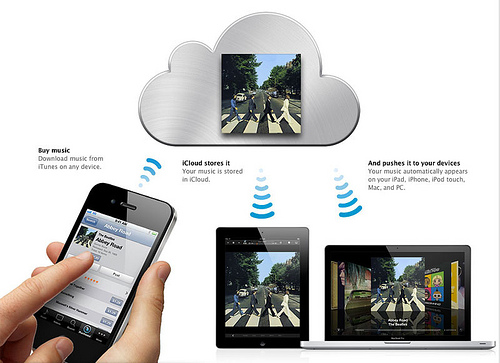 iCloud is a cloud storage and cloud computing service from Apple Inc. announced on June 6, 2011 at the Apple Worldwide Developers Conference (WWDC). The service allows users to store data such as music files on remote computer servers for download to multiple devices such as iOS-based devices, and personal computers running OS X or Microsoft Windows. It also replaces Apple's MobileMe service, acting as a data syncing center for email, contacts, calendars, bookmarks, notes, to-do lists, and other data. MobileMe will be discontinued after June 30, 2012, with anyone who had an account before the unveiling of iCloud having their MobileMe service extended to that date, free of charge As of 2012, iCloud has over 125 million users.

Dropbox is file hosting service operated by Dropbox, Inc. that offers cloud storage, file synchronization, and client software. Dropbox, Inc. was founded in 2007 by MIT graduates Drew Houston and Arash Ferdowsi, as a Y Combinator startup company. Dropbox's basic service follows the freemium business model. Dropbox announced a new service, "Dropbox for Teams",marketed to businesses and other groups in 2011.Dropbox provides client software for Microsoft Windows, Mac OS X, Linux, Android, iOS, and BlackBerry OS, and web browsers. In 2008 Dropbox launched as a dead-simple cloud storage service that could be used by just about anyone. Even your grandparents can use Dropbox without calling you up, asking you to explain each of its features. Dropbox claims to have 50 million users worldwide.Apparently Apple wanted to buy Dropbox to launch their own cloud storage services before iCloud but surprisingly Dropbox refused.

SugarSync is a service that actively syncs files across computers and other devices. SugarSync is operated by SugarSync Inc. and is based in San Mateo, California. SugarSync enables its users to backup, access, sync and share all of your documents, photos, music and movies so that you can access them from your laptop, iPhone, iPad, Android, BlackBerry, or any other device. SugarSync is available for Windows and Mac OS X. For mobile devices, SugarSync has an
app for iOS (iPhone, iPad, iPod Touch), Android, BlackBerry, Windows Mobile and Symbian devices, and a Windows Phone 7 app is in development. SugarSync was launched in March 2008. The software is designed to sync all of a user's
files (documents, media, photos, etc.) across as multiple machines. The company, formerly called "Sharpcast", and its service have received press coverage and reviews from various media outlets. In September, 2011,Gizmodo reviewed SugarSync and 10 other services and named SugarSync the Best Cloud Service.
Here
is the summary of comparison on different cloud service
I only used Dropbox, Google Drive and
iCloud. I cannot comment anything on Skydrive and Sugarsync.
I found that iCloud is more for the
users with all the Apple devices. iPhone, iPad and Mac. If you are not using
them all together, I can say iCloud is useless. For example, I can't even open Microsoft
excel or word by using iCloud unless you install iWork.
I have been using Dropbox and Google
Drive for a long time. Both of them offer very similar function. If you have an
android phone and android tablet, Google Drive is very convenience for you.
However, if you have android phone and iPad or iPhone and android tablet, I
will suggest Dropbox. It's easier to access all your files.


