Saturday, June 9, 2012

Cloud Storage Comparsion


Google Drive VS SkyDrive VS iCloud VS Dropbox VS SugarSync

Google Driveis a file storage and sync service by Google that was released on April 24, 2012. Rumors about Google Drive began circulating as early as March 2006. Google Drive is an extension of Google Docs. Google Docs is a free, Web-based office suite and data storage service offered by Google. It allows users to create and edit documents online while collaborating in real-time with other users. Google Docs combines the features of Word and Spreadsheets with a presentation program incorporating technology designed by Tonic Systems. Data storage of files up to 1 GB total in size was introduced on January 13, 2010, but has since been increased to 10 GB, documents using Google Docs native formats do not count towards this quota.The largely anticipated cloud storage feature by Google is said to be replacing most of Docs' features in 2012. This extension or replacement of Google Docs called Google Drive was opened to the public on April 24, 2012.


SkyDrive(officially Microsoft SkyDrive, formerly Windows Live SkyDrive) is a file hosting service that allows users to upload and sync files to a cloud storage and then access them from a Web browser or their local device. It is part of the Windows Live range of online services and allows users to keep the files private, share them with contacts, or make the files public. Publicly shared files do not require a Windows Live ID to access. The service offers 7 GB of free storage for new users. Additional storage is available for purchase. Users who signed up to SkyDrive prior to April 22, 2012 could opt-in for a limited time offer of 25 GB of free storage upgrade. The service is built using HTML5 technologies, and files up to 300MB can be uploaded via drag and drop into the web browser,or up to 2GB via the SkyDrive desktop application for Windows and Mac OS X. On its launch, SkyDrive was provided as a limited beta available to a few testers in the United States. On August 1, 2007, the service was expanded to a wider audience. As of 22 May 2008 SkyDrive was available to 62 countries and regions.
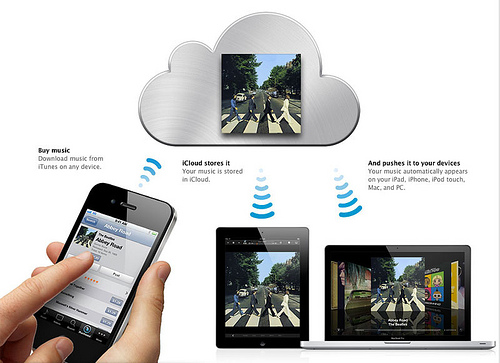
iCloud is a cloud storage and cloud computing service from Apple Inc. announced on June 6, 2011 at the Apple Worldwide Developers Conference (WWDC). The service allows users to store data such as music files on remote computer servers for download to multiple devices such as iOS-based devices, and personal computers running OS X or Microsoft Windows. It also replaces Apple's MobileMe service, acting as a data syncing center for email, contacts, calendars, bookmarks, notes, to-do lists, and other data. MobileMe will be discontinued after June 30, 2012, with anyone who had an account before the unveiling of iCloud having their MobileMe service extended to that date, free of charge As of 2012, iCloud has over 125 million users.

Dropbox is file hosting service operated by Dropbox, Inc. that offers cloud storage, file synchronization, and client software. Dropbox, Inc. was founded in 2007 by MIT graduates Drew Houston and Arash Ferdowsi, as a Y Combinator startup company. Dropbox's basic service follows the freemium business model. Dropbox announced a new service, "Dropbox for Teams",marketed to businesses and other groups in 2011.Dropbox provides client software for Microsoft Windows, Mac OS X, Linux, Android, iOS, and BlackBerry OS, and web browsers. In 2008 Dropbox launched as a dead-simple cloud storage service that could be used by just about anyone. Even your grandparents can use Dropbox without calling you up, asking you to explain each of its features. Dropbox claims to have 50 million users worldwide.Apparently Apple wanted to buy Dropbox to launch their own cloud storage services before iCloud but surprisingly Dropbox refused.

SugarSync is a service that actively syncs files across computers and other devices. SugarSync is operated by SugarSync Inc. and is based in San Mateo, California. SugarSync enables its users to backup, access, sync and share all of your documents, photos, music and movies so that you can access them from your laptop, iPhone, iPad, Android, BlackBerry, or any other device. SugarSync is available for Windows and Mac OS X. For mobile devices, SugarSync has an app for iOS (iPhone, iPad, iPod Touch), Android, BlackBerry, Windows Mobile and Symbian devices, and a Windows Phone 7 app is in development. SugarSync was launched in March 2008. The software is designed to sync all of a user's files (documents, media, photos, etc.) across as multiple machines. The company, formerly called "Sharpcast", and its service have received press coverage and reviews from various media outlets. In September, 2011,Gizmodo reviewed SugarSync and 10 other services and named SugarSync the Best Cloud Service.

Here is the summary of comparison on different cloud service


I only used Dropbox, Google Drive and iCloud. I cannot comment anything on Skydrive and Sugarsync.

I found that iCloud is more for the users with all the Apple devices. iPhone, iPad and Mac. If you are not using them all together, I can say iCloud is useless. For example, I can't even open Microsoft excel or word by using iCloud unless you install iWork.

I have been using Dropbox and Google Drive for a long time. Both of them offer very similar function. If you have an android phone and android tablet, Google Drive is very convenience for you. However, if you have android phone and iPad or iPhone and android tablet, I will suggest Dropbox. It's easier to access all your files.

Wednesday, May 2, 2012

The Truth Behind Success with Mobile Apps

I found this is very interesting fact on mobile apps.  App-Promo launched First Annual App Developer Survey to Understand App Success and Highlight the Business side of Applications in the beginning of the April. Survey time started from April 6 till April 22, 2012. They invite all the app developers from iOS, Andriod, BlackBerry, Windows and Symbian to participate. However, in the result of this graph, it didn't really show the sample size of the survey and the ratio of mobile platform. It's still good to know, especially if you want to develop mobile apps.


Source: app-promo

Monday, April 16, 2012

Receive a $400 phone bill for texting. That's ridiculous, but it happened

I wasn't too surprised when I read the news this morning. All the telecom carrier/company want to charge more to their customers as much as possible. They won't really tell you what to be careful. When you find the unusual charge, they will happy to show you in the agreement with very small line.  Good thing is if you talk to them, you probably get the chance to waive the money. If you don't say anything, they will happy to collect from you.  
Be careful on what you do on your phone. There're many hidden cost from the telecom company. 

Dad takes stand against Rogers over texting charges


A B.C. father is refusing to pay a $1,400 bill received from Rogers after his teenaged son was charged for sending hundreds of texts to his girlfriend, despite a contract that includes unlimited texting in Canada.
"I thought he could text a thousand times a day, because that’s perfectly fine. He’s covered for all of Canada," said Alex Dunsmore of Kamloops, B.C. "His girlfriend lives four blocks away."
It started when Dunsmore's son's girlfriend downloaded a "free" texting app — from a U.S. company called HeyWire — to send free texts anywhere. When Dunsmore’s son Ryan texted her back, he had no idea it would incur a charge for long distance texts, routed through the U.S. then to his girlfriend in Canada.
“He was responding to a text.… He thought he was just texting down the street,” Dunsmore said. “Obviously it took a long, different path [via] Arlington, Illinois."
Over 1,000 texts sent
Dunsmore said Rogers allowed 1,300 of those texts to go through in one month — all to the same number — without informing him his son's $35 "unlimited" texting plan was going way over the basic charge.
 “Why was I not notified, as the legally responsible person in this contract, that there was suddenly this atypical spending?” Dunsmore asked.
He said this type of long distance texting should trigger a notice to the customer, similar to the one sent when cellphone customers leave Canada and face roaming charges.
“I think that somebody somewhere has decided not to [notify customers] about this because they don’t have to.”
When Dunsmore got the bill — $400 for one month, including the texts — he complained to Rogers and refused to pay for that portion.
Ryan Dunsmore was replying to texts sent by his girlfriend, who was using a U.S.-based app. (CBC)
“I think it’s a deliberate process on Rogers's part to try to get more money out of their clients,” he said.
Dunsmore continued to pay for the services he signed up for. He appealed to Rogers to forgive the texting charges, he said, but got nowhere. He said the company told him his son should have recognized the U.S. area code on the number his girlfriend was given by the app provider.
Dunsmore pointed out that his 16-year-old doesn’t know all the area codes inside or outside Canada, and that Ryan's girlfriend told him it was a special number for free texting.
“She feels pretty bad. Not that it’s her fault or anything,” Ryan Dunsmore said.
'No charge' to app user
Ryan’s girlfriend had downloaded the app on her iPod through the iTunes App Store. HeyWire’s advertising on its App Store page says there is "no charge to you even if your friends don’t have the app."
"Both parties are thinking it’s free," Alex Dunsmore said. "There is no notification on her end, either. As far as she’s concerned, she’s texting for free."
Because the texting charges went into arrears, Rogers eventually cut off both Dunsmore's son's and daughter's phones — and charged him $800 for "cancelling" the contracts. (Dunsmore doesn't have his own cellphone).
"They charged me $400 [each] because the contract was terminated early. But they were the ones that terminated it because I simply didn’t pay the money in dispute," he said.
Rogers told CBC News in an email that it’s up to parents to monitor their teen’s usage.
"I recognize that the customer may find this frustrating," spokesperson Leigh-Ann Popek wrote. "But the account holder is ultimately responsible for the account. We do not monitor how many texts or calls customers make. But we offer the tools to allow our customers to keep a close eye on their usage.
"Customers are able to see their current usage through our free Rogers MyAccount app on their device or online at www.rogers.com. This is especially helpful for parents."
'A lot of money in it'
Vancouver app developer and industry commentator Ian Bell said he believes it’s in Rogers's financial interest not to inform parents when these kinds of charges are mounting.
"Carriers need to do a better job of helping people understand when they are incurring these charges as they are happening. But they are not, because there’s a lot of money in it."
Rogers said it's up to parents to monitor their teens' usage carefully. (CBC)
Rogers said it has no business relationship with HeyWire and does not share in any revenue generated from people downloading the app. "Rogers would not be compensated by HeyWire, nor would we compensate HeyWire for any downloads, users, usage of their application," Popek said.
However, telecom companies do get a cut of the long-distance texting charges billed to their customers.
"Part of the long distance charge goes to Rogers, part goes to the U.S. carrier," said Marc Choma of the Canadian Wireless Telecommunications Association. He said Canadian telecoms don't reveal how much their cut is, even to him.
Choma also said the popularity of texting has exploded, especially among teens. Last year, he said, 78 billion texts were sent from within Canada, compared to 56.4 billion in 2010. He said he doesn't know how many of those texts were sent via apps.
Companies 'always looking for another sucker'
Commentator Bell said telecoms and app marketers count on customers blaming themselves for excessive charges and simply paying the bills.
"People get caught in it, then they stop using the app forever and then they move on," Bell said. "These [app] companies are always looking for another sucker."
Dunsmore’s bill from Rogers — for the texts, contract cancellations and other fees — is now almost $1,400. It’s been sent to a collection agency, but he said he won’t pay it out of principle.
"Cellphone companies are getting a reputation, and I believe rightly so, of actually bullying people around," he said. "This is about what is reasonable and what is right."
Source: CBC news


Friday, April 13, 2012

Be ready for Royal Bank raising bank fee


If you are using Royal Bank, prepare the bank fee will be raised by June 1, 2012. I wasn't happy with the raise, especially I cannot get the free temporary cheque from Royal bank anymore. It's bad.


I found the article below, and it's kind of make sense why Banks want to raise the bank fee. 
As debt-heavy Canadians become more cautious about borrowing, the banks are looking to higher fees to make up the shortfall.
Canada’s largest bank is the latest to announce it is raising a number of fees, including the rate it charges for credit card cash advances.
The new fees, which affect everything from personal banking to business accounts, become effective June 1, RBC said in a brochure mailed to clients.
The move reflects the increased costs of doing business, the bank said.
“We operate in a competitive environment and work hard at keeping costs down; however, we must price our products and services to reflect the increased cost of doing business,” an RBC spokesperson said in an email.
The main impact of the RBC announcement will be on customers who pay monthly services fees on their everyday bank account, known as RBC’s Signature No Limit Banking account. Those fees will rise to $14.95 a month from $13.95.
Interest rates on credit card cash advances will rise to 21.99 per cent from 19.99 per cent.
Seniors will pay a higher annual fee to carry certain kinds of RBC Visa rewards cards. For example, the annual fee for the RBC Rewards Visa Preferred card will rise to $110 from $70.
At least two other banks, BMO and TD, have also raised their fees in recent months, according to David McVay, head of McVay & Associates and a former bank executive turned consultant.
As the economy slows and banks write fewer loans and mortgages, they’re looking for other ways to boost their revenue, McVay said in an interview.
“Raising fees is one way of doing that,” McVay said.
McVay called the monthly fee increase “modest.” Among Canada’s six largest banks, the monthly fee for maintaining a daily banking account ranges from $12.95 to $21.95, he said.
In some cases the new fees come with added value, he noted. Seniors who hold RBC Visa rewards cards will get free 7-day out of province/out of country emergency medical coverage.
RBC said its clients can reduce their banking fees by using online banking and bank machines and also by picking the service package that best suits their needs.
Written by Dana Flavelle
Source: Moneyville

Wednesday, April 11, 2012

Get Your Finances Organized in 12 Steps


I watch a TV show called Til Debt Do US Part from SLICE channel last night. This is a reality show, and they picked a family who have many debt. Then, A financial adviser, Gail Vaz-Oxlade, will help them getting out of the debt.  It's clear that most of the debt is due to the bad spending habits. In each episode, Gail will  show the family using different tricks to change the spending habits. It's pretty good show. I recommend you to take a look when you get a chance. 
I also went to slice web site to learn more this show, and I found Gail wrote "Get your Finances Organized in 12 Steps". It's quite simple and doable. 

INITIAL SET-UP
  1. Gather all your paperwork. Create a file folder for each of the following:
    • Chequing accounts
    • Savings accounts
    • Retirement accounts
    • Investment accounts
    • Credit card accounts
    • Loans
    • Personal lines of credit
    • Mortgage
    • Insurance (life, disability, health, critical illness, home, car)
    • Estate (wills and powers of attorney)
    • Tax returns

  2. Welcome to 21st-century banking. If you don’t already have it, set up telephone or internet banking for your accounts.
  3. Reduce fees by setting up a buffer. If you can afford it, transfer a $1,000 float to your chequing account (pretend it isn’t there) and use that to minimize your banking costs. 
  4. Save automatically. Create an automatic withdrawal from your chequing account to a savings account that will not be touched. Most people won’t put money into a savings account on a regular basis and opt instead to wait for a tax refund or bonus before setting aside money for the future. Establish an automatic savings deposit every month and your nest egg will accumulate faster than you think. Opening an account under two names will require approval from each person for withdrawals. That way, you can keep each other in line. 
  5. Create a monthly bill summary. List your bills according to when they need to be paid to keep from missing a bill. If you have bills that are paid automatically from your account, write an “A” beside these bills and remember to deduct them from your spending journal when you pay bills each month. 
  6. Set up your in-baskets. Create an in-basket with two bills folders labelled “1–15” and “16–31.” When a bill comes in, look at the due date and put the bill in the appropriate folder. Recycle all the marketing crap in the envelope. Create a second in-basket with three folders labelled “bank statements,” “bills paid,” and “tax receipts.”

    WEEKLY 
  7. Make a date with your money.

    Set aside time in your schedule on the 12th and 28th of each month to pay bills. You’ll need anywhere from 15 minutes to an hour, depending on your bills.

    Designate one place in your home where you always pay your bills and keep it equipped with bill-paying supplies: your spending journal, envelopes, stamps, pens, pencils, a calculator, tape, a stapler, return address labels, and a recycling bin for all that junk mail you’re going to dump.

    When you pay a bill, write the cheque or transaction number, the amount paid, and the date you paid it on the bill. Put the paid bill in your “bill’s paid” file. Deduct the amount you’ve spent from your spending journal. If a bill has not been paid in full (tax bills are paid over several months, for example) put it back in your bills folder so you don’t forget it.

    MONTHLY 
  8. Reconcile your bank statements. When your bank statements come in, put them in your in-box folder. Make a date when all your statements are in (it will depend on when you receive them) to:

    a) Review your statements to make sure there are no mistakes.
    b) Reconcile your spending journal. Clearly mark the cheques that have been returned to you and highlight the ones in your spending journal that haven’t yet cleared the bank. A cheque that takes a long time to clear the bank can lull you into thinking you have more money than you do. Go back at least one month to make sure all previous cheques have cleared.
    c) Talk about anything unusual.

    QUARTERLY 
  9. Update your files. Once every quarter, file all your paperwork to keep your system current.
  10. Keep in touch. Have dinner with your business partner to talk about the bumps, your goals, and how you’re doing.

    ANNUALLY
  11. Re-vamp your budget. Review your budget using last year’s credit card statements and bank statements to see what you actually spent. If you spent more on a particular category, make sure you know why or look for ways to trim. 
  12. Clean up. Go through your files at the end of each year and throw out bills and receipts that are no longer needed for auditing/budgeting purposes.
Written by: Gail Vaz-Oxlade, host of Til Debt Do Us Part
Source : Slice